
Need help?
Q. Are you here because the login page looks unexpected?
A. Yes, I was expecting the old login page. In this case the site will have recently migrated to IressID. A new authentication process is in place. Read on for more details on how to use IressID.
Q. How do I get access to Xplan now?
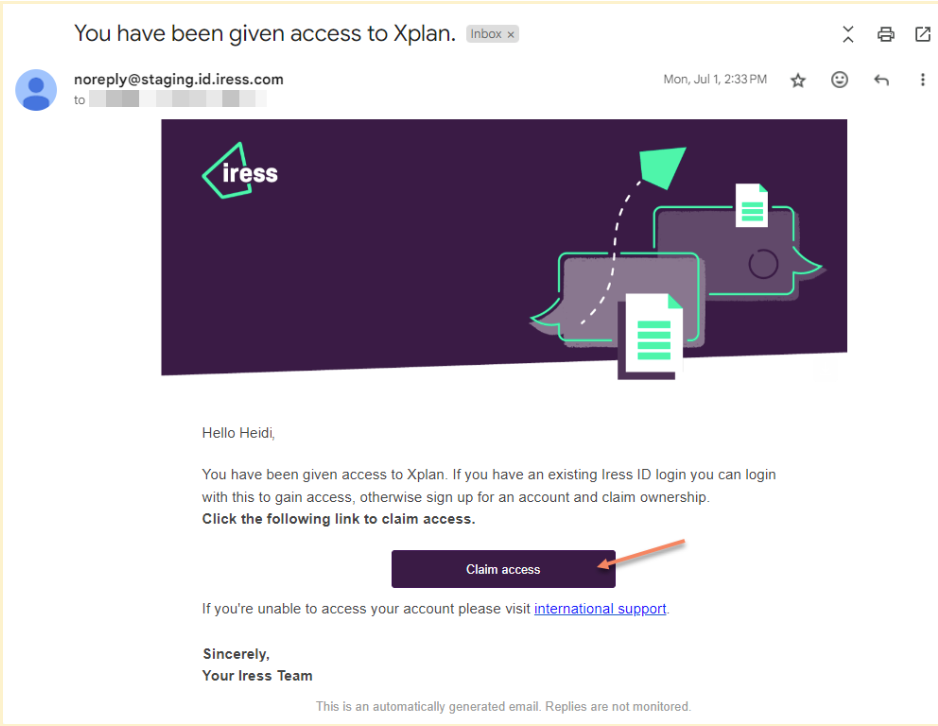
A. The first step is to claim access from your email invitation. When IressID is enabled on your Xplan site, users with an email address on record and with the 'Login with Password' or 'Login with SSO' capability will automatically receive an invitation email to link their Xplan account to IressID. This email will be sent to the primary address listed under Contact Details. To claim access, open the email, click the Claim Access button, and follow the instructions.
Q. Once I claim access what does the process look like?
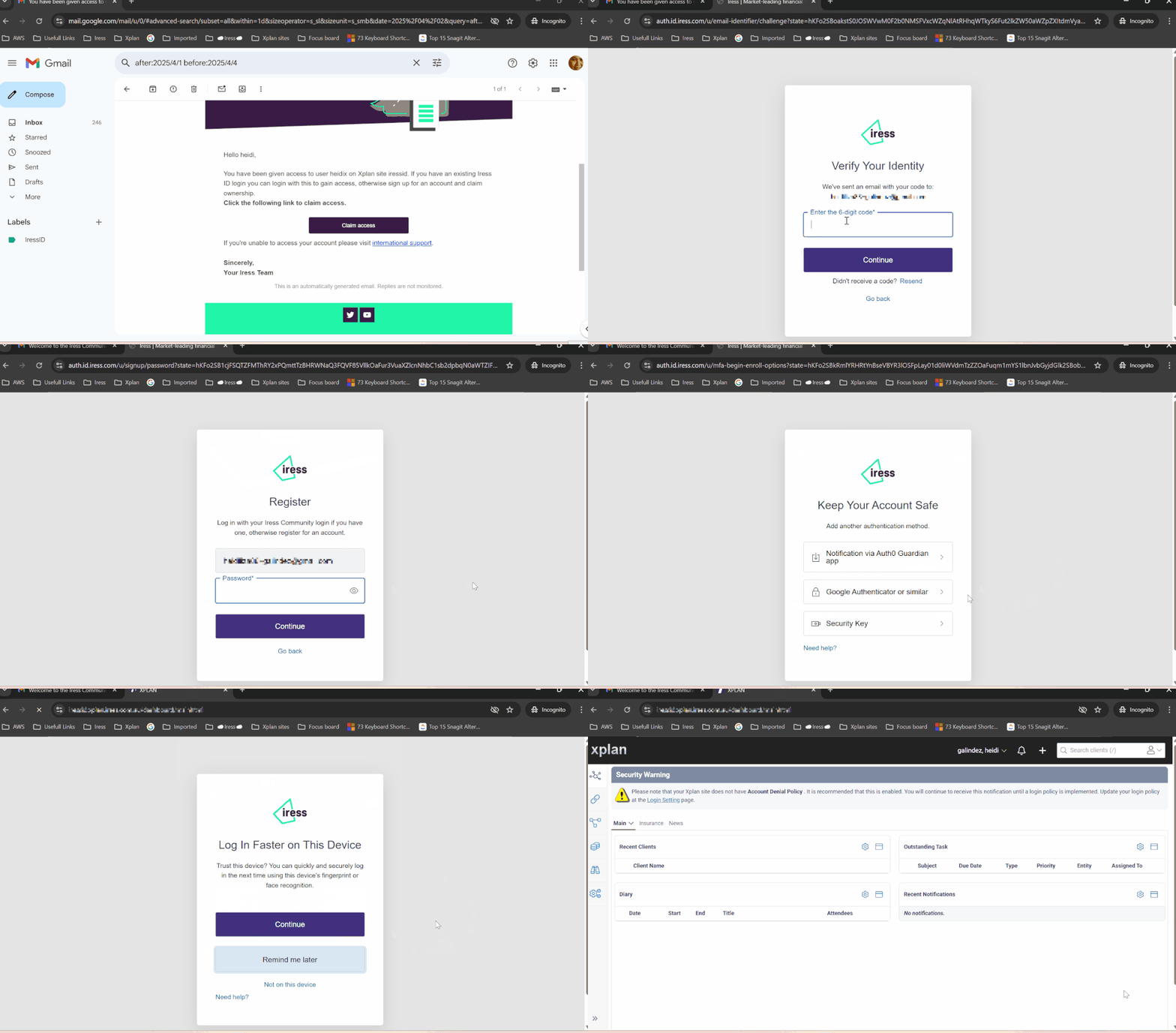
A. Below is a visual of the procedure for:
- Claiming access from the email
- Verifying your identity
- Setting up a password for your new account
- Setting up Google Authenticator for MFA
- Restored access to Xplan
Q. My Xplan password does not work and I have forgotten my IressID/Community password, can I reset it?
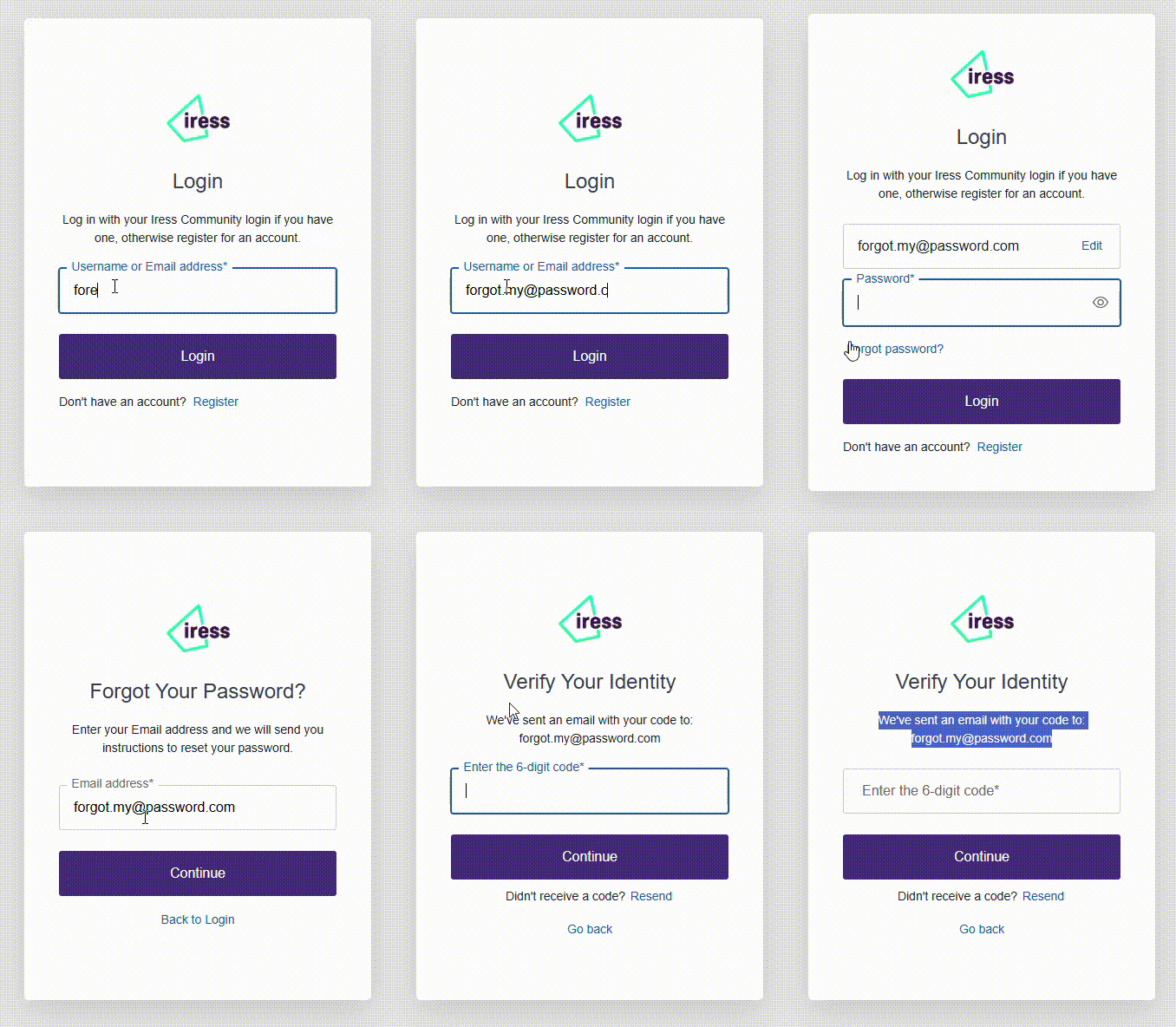
A. Yes, you can reset the password by putting in your email and selecting "Login", then on the next page select "Forgot Password?". The animation below shows you how to do this. This will send you an email to reset your password. If you do not receive the email, then it may mean you never had an IressID or community account, so Register for a new account instead.
Q. When is IressID coming?
A. Iress is rolling out IressID to clients across the course of 2025. Prior to rollout sites will receive notification within Xplan to tell them when IressID is going live for their business.
Q. What's changed from a user's perspective?
A. When you access your Xplan site in a browser, you'll see the new IressID login page. Once you enter your registered IressID account name and password, you'll be redirected to your normal Xplan home page as before.
Q. How is multi-factor authentication (MFA) used?
A. With the new IressID login screen, your site has been automatically activated to use MFA, you'll be able to supply the additional authentication factor, e.g. OTP code generated by software like Google Authenticator or MS Authenticator etc. as well as other MFA factors like Push or Biometrics.
Q. How is MFA configured?
A. With IressID, all sites are automatically enabled with MFA. You'll be asked to set it up from the login page. Once you've logged in, you can adjust or configure your MFA and other IressID settings via the My IressID user profile menu:
Q. How can I change my IressID email and password?
A. Once you've logged into Xplan, or other Iress Wealth products, e.g. Iress Community, Learning Centre and Advisely, you can access your IressID user profile page to change your email address, password and MFA settings. If your site is activated to use SSO, you'll need to use your own identity provider's service to perform such tasks. The link to the user profile page is above.
Q. IressID has been enabled on our site, but some users haven't received the invitation email yet.
A. Site administrators can resend the invitation email to a single user or multiple users. For more information see:
Q. If there's more than one IressID linked to useradmin, can I tell who among the IressID accounts login to Xplan?
A. Yes, this is captured in the Xplan audit trail.
Q. How does single sign-on (SSO) login work?
A. Iress will work with your site administrator to configure the SSO (Federated authentication) settings inside IressID to integrate with your own identity provider. Once it's set up correctly, when you access Xplan as normal, you'll be redirected to your identity provider's login page.
Q. How will a new user register with IressID?
A. When a new user is created as usual through Xplan, the user's email address will be captured and an invitation email will automatically be sent to their address.
Q. Can I still access Xplan even if my Xplan user account has expired?
A. No, the Xplan user account expiry date is still applied. If your IressID is still linked to an expired Xplan user account, you can't log in to Xplan. If your Xplan account has expired, you'll land on the classic Xplan page with a message that your account has expired.
Q. I received an email saying I have been given access to Xplan. In the email, I clicked on the “Claim access” button and it opened the IressID login page pre-populated with the email address instructing me to register or login. I already have IressID account (Iress community, Iress Learning Centre and Advisely) connected to a different email address, can I claim Xplan access using the email address connected to my existing IressID account?
A. Yes, you can. Use your email connected to your existing IressID and continue the process to log in to claim access to Xplan.
Q. Can I link multiple IressID to one Xplan account?
A. Yes, you can link 2 or more IressIDs to 1 Xplan account. Site admin can nominate up to 10 Xplan accounts to be linked to multiple IressID. For more information see:
Q. Currently we have multiple users trying to log in with the same email address. Only the user who registered for IressID first can log in, while the others are either logged in as the first user when trying to register or cannot set up their own IressID.
A. Every user needs to register his/her own IressID. They can not share the same email address. Site admin can update the Xplan user IressID and send the invitation to claim access.
Q. I tried to claim access but keeps on taking me to Windows pin and it keeps on popping back up so I cannot go ahead of this windows pin.
A. Windows pin may let you register MFA, however, it is known that it does not always work. It is recommended to use the Google Authenticator when setting up the IressID MFA. To set-up google authenticator, access your My IressID Profile and choose 'Try another method'. Once login to your profile, you can remove the Windows authenticator.
Q. Our site is using the Xplan system setting password expiry - will this setting now apply to IressID? Or is there a way to control similar settings for IressID?
A. The Xplan system setting is not in use for Xplan IressID, the User/Adviser setting will eventually be removed. To control password policy settings and expiry and manage the password requirements, you may consider setting up SSO from your own authentication system.
Q. Is it expected to experience a delay (up to 15mins) when resetting their password?
A. Timing will depend on your email server's processing time. Normally it will take less than 15 minutes.
Q. Is there a limit for failed login attempts?
A. IressID is configured with Auth0 Brute-force Protection and is set to 'Default' to use the standard limit of 10 maximum attempts.
Q. What are the password strength parameters that IressID use?
A. Iress uses the “Good” password strength policy in the Auth0 guide.
Hopefully the above helps you understand the changes.
If you have any questions, please contact your Iress representative or support team.
Alternatively you can select another application:
Alternatively if you need help, you can contact: